基本使用
1
2
3
4
5
6
7
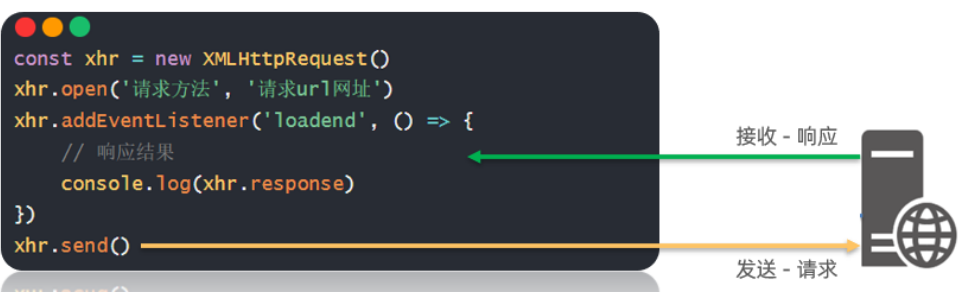
| const xhr = new XMLHttpRequest()
xhr.open('请求方法', '请求url网址')
xhr.addEventListener('loadend', () => {
console.log(xhr.response)
})
xhr.send()
|

以一个需求来体验下原生 XHR 语法,需求为获取所有省份列表并展示到页面上
1
2
3
4
5
6
7
8
9
10
11
12
13
14
15
16
17
18
19
20
21
22
23
24
25
26
27
28
29
30
31
32
33
34
35
36
37
38
39
40
| <!DOCTYPE html>
<html lang="en">
<head>
<meta charset="UTF-8">
<meta http-equiv="X-UA-Compatible" content="IE=edge">
<meta name="viewport" content="width=device-width, initial-scale=1.0">
<title>XMLHttpRequest_基础使用</title>
</head>
<body>
<p class="my-p"></p>
<script>
/**
* 目标:使用XMLHttpRequest对象与服务器通信
* 1. 创建 XMLHttpRequest 对象
* 2. 配置请求方法和请求 url 地址
* 3. 监听 loadend 事件,接收响应结果
* 4. 发起请求
*/
// 1. 创建 XMLHttpRequest 对象
const xhr = new XMLHttpRequest()
// 2. 配置请求方法和请求 url 地址
xhr.open('GET', 'http://hmajax.itheima.net/api/province')
// 3. 监听 loadend 事件,接收响应结果
xhr.addEventListener('loadend', () => {
console.log(xhr.response)
const data = JSON.parse(xhr.response)
console.log(data.list.join('<br>'))
document.querySelector('.my-p').innerHTML = data.list.join('<br>')
})
// 4. 发起请求
xhr.send()
</script>
</body>
</html>
|
查询参数
原生 XHR 需要自己在 url 后面携带查询参数字符串,没有 axios 帮助我们把 params 参数拼接到 url 字符串后面,
1
2
3
4
5
6
7
8
9
10
11
12
|
const xhr = new XMLHttpRequest()
xhr.open('GET', 'http://hmajax.itheima.net/api/city?pname=辽宁省')
xhr.addEventListener('loadend', () => {
console.log(xhr.response)
const data = JSON.parse(xhr.response)
console.log(data)
document.querySelector('.city-p').innerHTML = data.list.join('<br>')
})
xhr.send()
|
多个查询参数,如果自己拼接很麻烦,这里用 URLSearchParams 把参数对象转成“参数名=值&参数名=值“格式的字符串,语法如下:
1
2
3
4
5
6
7
8
9
|
const paramsObj = new URLSearchParams({
参数名1: 值1,
参数名2: 值2
})
const queryString = paramsObj.toString()
|
提交数据
1、需要自己设置请求头 Content-Type:application/json,来告诉服务器端,我们发过去的内容类型是 JSON 字符串,让他转成对应数据结构取值使用
2、前端要传递的请求体数据,需要我们自己把 JS 对象转成 JSON 字符串。
3、原生 XHR 需要在 send 方法调用时,传入请求体携带
1
2
3
4
5
6
7
8
9
10
11
12
13
| const xhr = new XMLHttpRequest()
xhr.open('请求方法', '请求url网址')
xhr.addEventListener('loadend', () => {
console.log(xhr.response)
})
xhr.setRequestHeader('Content-Type', 'application/json')
const user = { username: 'itheima007', password: '7654321' }
const userStr = JSON.stringify(user)
xhr.send(userStr)
|

xhr.open('请求方法', '请求url网址')xhr.addEventListener('...)

