方式1:使用requestAnimationFrame
不能一次性将几万条都渲染出来,而应该一次渲染部分 DOM,那么就可以通过 requestAnimationFrame 来每 16 ms 刷新一次
在渲染大量数据时,避免一次性将所有数据都渲染出来可以提高性能,以保持界面的流畅性。以下是一个示例代码,演示如何使用requestAnimationFrame来分批渲染大量数据,避免卡住界面:
1
2
3
4
5
6
7
8
9
10
11
12
13
14
15
16
17
18
19
20
21
22
23
24
25
26
27
28
29
30
31
32
33
34
35
36
37
38
39
40
41
42
43
44
45
| <html lang="en">
<head>
<meta charset="UTF-8">
<meta name="viewport" content="width=device-width, initial-scale=1.0">
<meta http-equiv="X-UA-Compatible" content="ie=edge">
<title>Document</title>
</head>
<body>
<ul>控件</ul>
<script>
setTimeout(() => {
// 插入十万条数据
const total = 100000
// 一次插入 20 条,可以根据实际性能调整
const once = 20
// 渲染数据总共需要几次
const loopCount = total / once
let countOfRender = 0
let ul = document.querySelector("ul");
function add() {
// 优化性能,使用文档片段插入,减少回流
const fragment = document.createDocumentFragment();
for (let i = 0; i < once; i++) {
const li = document.createElement("li");
li.innerText = Math.floor(Math.random() * total);
fragment.appendChild(li);
}
ul.appendChild(fragment);
countOfRender += 1;
loop();
}
function loop() {
if (countOfRender < loopCount) {
// 使用requestAnimationFrame在每一帧中执行渲染
window.requestAnimationFrame(add);
}
}
loop();
}, 0);
</script>
</body>
</html>
|
上述代码会将十万条数据分批插入到ul列表中,每次插入20条数据,并通过requestAnimationFrame在每一帧中执行渲染,保证不卡住界面。这样用户可以逐步看到数据的渲染过程,而不是等待所有数据都渲染完毕后才显示。这种方式可以提高用户体验并避免界面卡顿。
方式2:使用虚拟滚动
使用虚拟滚动(Virtual Scrolling)可以在渲染大量数据时提高性能,只渲染可见区域的数据,而不是将所有数据都插入到DOM中。这样可以减少DOM操作和内存占用,从而提升性能和响应速度。以下是使用虚拟滚动完成这道题的示例代码:
1
2
3
4
5
6
7
8
9
10
11
12
13
14
15
16
17
18
19
20
21
22
23
24
25
26
27
28
29
30
31
32
33
34
35
36
37
38
39
40
41
42
43
44
45
46
47
48
49
50
51
52
53
54
55
56
57
58
59
60
61
62
63
64
65
66
67
68
69
70
71
72
73
74
75
76
77
78
79
| <!DOCTYPE html>
<html lang="en">
<head>
<meta charset="UTF-8">
<meta name="viewport" content="width=device-width, initial-scale=1.0">
<meta http-equiv="X-UA-Compatible" content="ie=edge">
<title>Document</title>
<style>
.container {
height: 300px;
overflow: auto;
}
.item {
height: 30px;
line-height: 30px;
border-bottom: 1px solid #ccc;
}
</style>
</head>
<body>
<div class="container">
<div class="content">
</div>
</div>
<script>
setTimeout(() => {
const total = 100000;
const itemHeight = 30;
const container = document.querySelector(".container");
const content = document.querySelector(".content");
// 创建并设置虚拟内容的总高度
let spacer = document.createElement("div");
content.appendChild(spacer);
const visibleHeight = container.clientHeight;
const visibleItemCount = Math.ceil(visibleHeight / itemHeight);
// 创建一个固定内容的数组
const data = Array.from({ length: total }, (_, index) => index);
function renderItems() {
const scrollTop = container.scrollTop;
const startIndex = Math.floor(scrollTop / itemHeight);
const endIndex = startIndex + visibleItemCount;
// 更新spacer高度来模拟滚动位置之前的未渲染内容
spacer.style.height = `${startIndex * itemHeight}px`;
const itemsFragment = document.createDocumentFragment();
for (let i = startIndex; i < endIndex && i < total; i++) {
const item = document.createElement("div");
item.className = "item";
item.innerText = `Item ${i}`;
itemsFragment.appendChild(item);
}
// 移除旧的项目并添加新的项目
Array.from(content.children).forEach(child => {
if (child !== spacer) content.removeChild(child);
});
content.appendChild(itemsFragment);
// 调整内容区域的总高度以适应新的spacer高度
content.style.height = `${Math.max(total * itemHeight - spacer.style.height.replace('px', ''), 0)}px`;
}
function handleScroll() {
startIndex = Math.floor(container.scrollTop / itemHeight);
endIndex = startIndex + visibleItemCount;
renderItems();
}
container.addEventListener("scroll", handleScroll);
renderItems();
}, 0);
</script>
</body>
</html>
|
在上述代码中,通过设置一个具有固定高度的容器,使用overflow: auto来实现滚动。通过计算可见区域的高度和单个元素的高度,确定可见区域能容纳的元素数量。然后根据滚动位置计算出当前可见区域的元素索引范围,只渲染这一部分数据,从而实现虚拟滚动。随着滚动事件的触发,动态更新可见区域的元素。这样在大量数据的情况下,只有可见区域的元素会被渲染,大大提高了性能和响应速度。
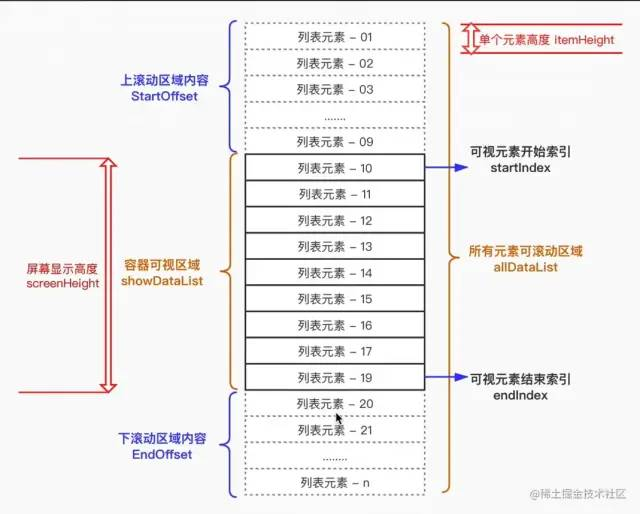
其核心思想就是在处理用户滚动时,只改变列表在可视区域的渲染部分,具体步骤为:
先计算可见区域起始数据的索引值 startIndex和当前可见区域结束数据的索引值 endIndex,假如元素的高度是固定的,那么 startIndex的算法很简单,即 startIndex = Math.floor(scrollTop/itemHeight),endIndex = startIndex + (clientHeight/itemHeight) - 1,再根据 startIndex 和 endIndex取相应范围的数据,渲染到可视区域,然后再计算 startOffset(上滚动空白区域)和 endOffset(下滚动空白区域),这两个偏移量的作用就是来撑开容器元素的内容,从而起到缓冲的作用,使得滚动条保持平滑滚动,并使滚动条处于一个正确的位置
上述的操作可以总结成五步:
- 不把长列表数据一次性全部直接渲染在页面上
- 截取长列表一部分数据用来填充可视区域
- 长列表数据不可视部分使用空白占位填充(下图中的
startOffset和 endOffset区域)
- 监听滚动事件根据滚动位置动态改变可视列表
- 监听滚动事件根据滚动位置动态改变空白填充